
HDR for Gaming Explained: HDR10 vs Dolby Vision (and Why It Matters)

Updated: Mar 5
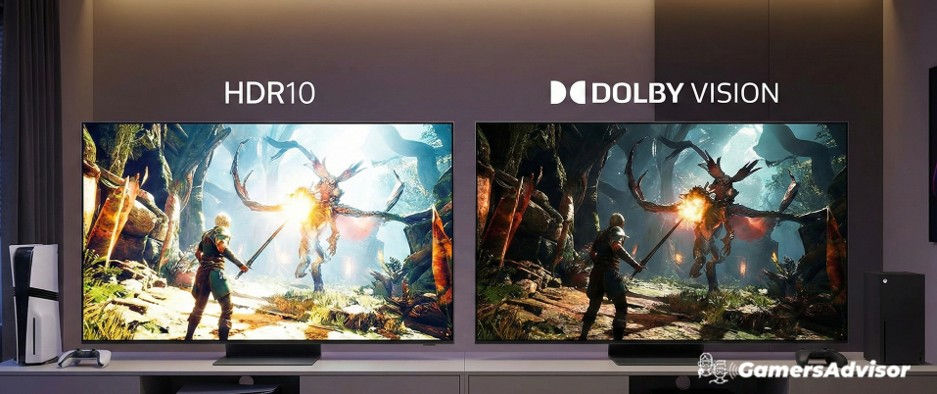
High Dynamic Range, better known as HDR, has become one of the most important technologies in modern gaming displays. It directly affects brightness, contrast, color depth, and how realistic games look on screen.
However, many console gamers are confused by the different HDR formats available today, especially HDR10 and Dolby Vision. While both aim to improve image quality, they work in different ways and can deliver noticeably different results depending on the TV and console being used.
This guide explains HDR for gaming in depth, breaks down HDR10 vs Dolby Vision, and clarifies which format truly matters for console players.
What Is HDR and Why It Matters for Gaming
HDR allows a display to show a wider range of brightness levels and colors compared to standard dynamic range (SDR).
In gaming, HDR improves:
Brighter highlights such as sunlight, explosions, and reflections
Deeper blacks and better shadow detail
More realistic colors and depth
Instead of compressing brightness into a limited range, HDR spreads visual information across a much wider spectrum, making scenes look closer to how the human eye perceives them.
Modern consoles like PlayStation 5 and Xbox Series X are built with HDR in mind, and most new games are designed to take advantage of it.
Advert
HDR10 vs Dolby Vision for Gaming: The Core Difference
The main difference between HDR10 and Dolby Vision lies in how they handle brightness and image data.
HDR10 uses static metadata. This means brightness and contrast information is set once for the entire game or scene and remains fixed throughout.
Dolby Vision uses dynamic metadata. It adjusts brightness and tone mapping scene by scene or even frame by frame.
In practice:
HDR10 applies one HDR profile across the whole experience
Dolby Vision continuously optimizes the image based on each moment
This allows Dolby Vision to preserve more detail in very bright or very dark scenes, especially on high-end displays.
Advert
How HDR10 Works in Console Gaming
HDR10 is the baseline HDR standard used across the gaming industry.
Key characteristics:
Supported by virtually all HDR-capable TVs
Used by both PS5 and Xbox Series X
Simpler implementation
Because HDR10 is universal, every HDR-enabled game supports it by default.
While it does not adapt dynamically to each scene, a well-calibrated HDR10 display can still produce excellent gaming visuals with strong contrast and vibrant colors.
For most gamers, HDR10 already represents a major upgrade over SDR.
Advert
How Dolby Vision Enhances Gaming
Dolby Vision builds upon HDR by adding dynamic scene-by-scene adjustments.
Benefits in gaming include:
Better highlight control in bright scenes
Improved shadow detail in dark environments
More consistent image quality across different game lighting conditions
Xbox Series X currently offers broader Dolby Vision gaming support than PS5, which primarily relies on HDR10.
Dolby Vision works best on TVs with high peak brightness and strong local dimming or OLED panels, where the dynamic metadata can be fully utilized.
HDR for Gaming Explained: When the Differences Are Most Noticeable
The difference between HDR10 and Dolby Vision becomes more visible in:
Games with extreme lighting contrasts
Night scenes with bright artificial lights
Open-world environments with changing daylight
On lower-end TVs with limited brightness, both formats may look similar.
On premium displays, Dolby Vision often delivers more controlled highlights and smoother transitions between bright and dark areas.
However, HDR10 on a high-quality TV can still look outstanding.
Where Does HDR10+ Fit in Gaming?
HDR10+ is another dynamic HDR format developed primarily by Samsung and its partners.
Like Dolby Vision, HDR10+ uses dynamic metadata to adjust brightness scene by scene.
In gaming, however:
Support is limited
Few consoles and games actively use it
Adoption is far lower than HDR10 or Dolby Vision
Most HDR10+ implementation is currently focused on streaming content rather than gaming.
For console players, HDR10+ is not a major factor at this time, but understanding it helps when reading TV specifications.
Advert
Does HDR Improve Gaming Performance?
HDR does not affect frame rate, input lag, or responsiveness directly.
Its role is purely visual.
That said, a well-implemented HDR mode can improve visibility in dark scenes, helping players spot details that may be lost in SDR.
Some poorly optimized HDR modes can appear too dark or washed out, which is why proper TV calibration and in-game HDR settings are important.
HDR and HDMI 2.1: How They Work Together
HDR does not require HDMI 2.1 to function. It already worked over HDMI 2.0.
However, HDMI 2.1 enables:
Higher frame rates with HDR active
More bandwidth for advanced color depth
This allows modern consoles to deliver 4K HDR gaming at 120Hz on supported TVs.
Together, HDR and HDMI 2.1 create smoother and more visually impressive gaming experiences.
Common HDR Myths in Gaming
Dolby Vision always looks better than HDR10
Not necessarily. On lower-brightness TVs, HDR10 and Dolby Vision may look nearly identical.
HDR automatically improves every game
Some games have better HDR implementations than others. Poor HDR tuning can result in darker or less vibrant visuals.
You need the brightest TV for HDR
Higher brightness helps, but good contrast, local dimming, and panel quality are equally important.
Which HDR Format Should Console Gamers Prioritize?
For most players:
HDR10 is essential and universally supported
Dolby Vision is a nice bonus on supported TVs and Xbox consoles
If your TV supports Dolby Vision well, it can offer improved visual consistency in certain games.
If not, HDR10 still provides excellent HDR gaming when properly implemented.
The overall quality of the TV matters far more than the HDR format alone.
Advert
Final Thoughts
HDR has become a core part of modern console gaming, delivering brighter highlights, richer colors, and more realistic visuals.
HDR10 remains the industry standard and works across all HDR-enabled consoles and TVs. Dolby Vision builds on that foundation with dynamic adjustments that can improve image consistency on capable displays, particularly on Xbox Series X.
HDR10+ exists as an alternative dynamic format but currently plays a minor role in gaming.
Understanding HDR for gaming and the real differences between HDR10 vs Dolby Vision allows players to focus on what truly improves visual quality, rather than getting lost in spec-sheet marketing.
In most cases, a high-quality TV with strong HDR performance matters more than the specific HDR format it supports.

If you're looking for the best gaming TVs, or the best gaming monitors for PS5 and PS5 Pro and monitors for Xbox Series X, check our full buyer’s guides.
HDR for Gaming Explained: Frequently Asked Questions
What does HDR do for gaming?
HDR improves gaming visuals by expanding brightness, contrast, and color range. It allows brighter highlights, deeper blacks, and more realistic scenes compared to standard dynamic range displays.
Is HDR10 or Dolby Vision better for gaming?
HDR10 is the standard format supported by all HDR games and consoles. Dolby Vision uses dynamic metadata that can improve brightness control and consistency on supported TVs, especially on Xbox Series X.
Do all games support HDR?
Most modern games support HDR, but the quality of HDR implementation varies. Some titles are optimized better than others, which can affect brightness and color accuracy.
Does HDR affect gaming performance?
HDR does not impact frame rate or input lag directly. It only affects visual quality, although improved visibility in dark scenes can enhance gameplay experience.
Is HDR10+ important for console gaming?
HDR10+ uses dynamic metadata similar to Dolby Vision but currently has limited support in gaming. It is mainly used for streaming content and is not a major factor for console players today.
Advert


Comments