
Are Gaming Chairs Actually Good for Your Back? Ergonomics Explained

Updated: Mar 5
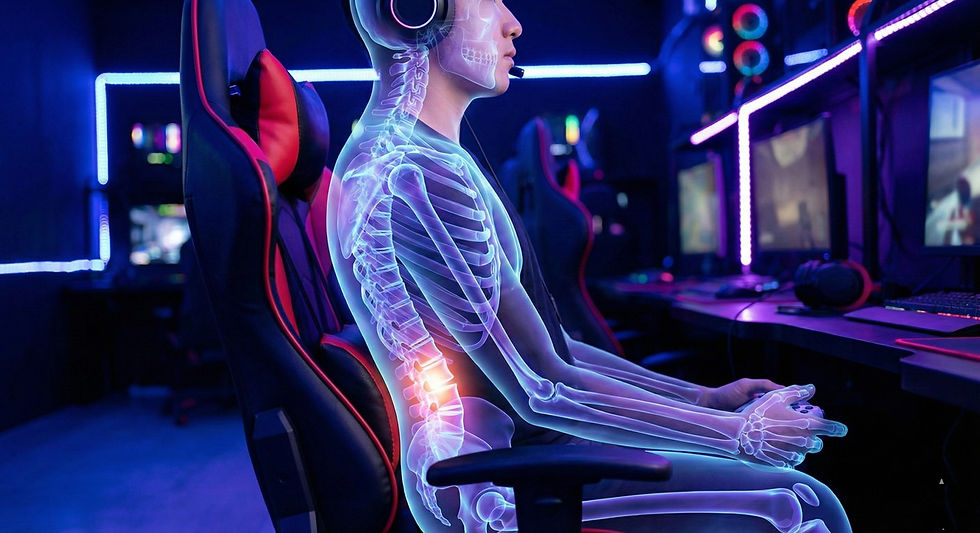
Spending long hours gaming puts significant stress on your spine, muscles, and joints. Whether you are playing competitive shooters, open world RPGs, or streaming for hours at a time, the way you sit has a direct impact on comfort, focus, and long-term health. This is where gaming chairs often promise better posture, improved lumbar support, and reduced back pain.
But are gaming chairs actually good for your back, or is it mostly marketing?
The real answer lies in ergonomics, design quality, adjustability, and how the chair is used. A well-designed gaming chair can support your spine properly and reduce fatigue, while a poorly designed one can make posture problems worse over time. In this guide, we will break down the science behind ergonomic seating, explain what truly makes a gaming chair beneficial for your back, and show you how to sit properly to get the most out of your setup.
Advert
Are Gaming Chairs Good for Your Back? The Ergonomics Truth
Many gamers ask the same question: are gaming chairs good for your back, or do they simply look more supportive than they really are. The truth is that gaming chairs can be extremely beneficial when they are built with proper ergonomic principles and adjusted correctly to the user’s body. However, not all models offer real support, and poor setup can cancel out even the best design.
To understand whether a gaming chair truly helps your back, it is essential to look at posture, spinal alignment, pressure distribution, and the specific features that influence long-term comfort.
Why Posture Matters for Gamers
Posture is not just about looking upright. It directly affects how pressure is distributed across your spine, how hard your muscles work to keep you balanced, and how much strain builds up during long gaming sessions.
When you sit with poor posture, such as slouching forward or rounding your shoulders, the natural curve of your spine collapses. This increases pressure on the lower back discs and forces your neck muscles to support the weight of your head in an unnatural position. Over time, this can lead to stiffness, chronic back pain, neck tension, and even reduced concentration while gaming.
Proper posture keeps your spine in a neutral alignment where the head, shoulders, and hips are stacked naturally. This allows muscles to relax instead of constantly compensating for imbalance. A good gaming chair should help maintain this alignment by supporting the lower back, encouraging an upright seating position, and allowing small adjustments to fit your body shape.
What Makes a Gaming Chair Ergonomic
Not every gaming chair is automatically ergonomic. The benefits depend on specific design features that work together to support your body properly.
Lumbar Support Explained
Lumbar support is one of the most important components of a back-friendly gaming chair. The lumbar region of your spine naturally curves inward, and when this curve is unsupported, your lower back tends to collapse into a slouched position.
Quality gaming chairs either include adjustable lumbar cushions or built-in lumbar mechanisms that move in and out to match the natural curve of your spine. Proper lumbar support helps maintain spinal alignment, reduces pressure on discs, and prevents lower back fatigue during long sessions.
Advert
Seat Depth, Tilt, and Recline
Seat depth determines how much of your thighs are supported while sitting. If the seat is too deep, it can press into the back of your knees and restrict circulation. If it is too shallow, your thighs will not receive enough support, placing more strain on your lower back.
Tilt and recline features allow you to slightly lean back, shifting some weight away from the spine and reducing continuous pressure. Studies show that a slight recline, usually between 100 and 110 degrees, can significantly reduce spinal load compared to sitting fully upright.
Adjustable Armrests and Shoulder Comfort
Armrests may seem minor, but they play a huge role in upper body comfort. When armrests are adjustable in height, width, and angle, they support your arms properly and prevent shoulder tension. Without proper arm support, your neck and shoulders work harder to hold your arms up, leading to fatigue and stiffness.
Gaming Chairs vs Office Chairs for Back Health
Many people wonder whether a gaming chair is actually better than a traditional office chair for posture and comfort. The truth is that both can be excellent or poor depending on design quality.
High-end office chairs often focus heavily on ergonomic research, offering advanced lumbar systems, breathable materials, and smooth adjustment mechanisms. Gaming chairs, on the other hand, tend to prioritize firm support, higher backrests, and adjustable recline, which can be beneficial for long gaming sessions where movement and comfort are important.
The biggest difference lies in posture encouragement. Gaming chairs often promote a more upright, supported position with strong lumbar reinforcement, while some office chairs allow more relaxed sitting that can lead to slouching if not adjusted properly.
Ultimately, a well-designed gaming chair with proper ergonomic features can be just as good, if not better, for your back than many standard office chairs.
Advert
Common Back Problems Caused by Poor Seating
Using a chair without proper support can lead to several posture-related issues over time.
• Lower back pain from lack of lumbar support
• Neck stiffness from leaning forward
• Shoulder tension due to poor arm positioning
• Hip discomfort from incorrect seat depth
• Fatigue from constant muscle strain
These problems often develop slowly, making them easy to ignore until discomfort becomes constant. The right gaming chair helps prevent these issues by maintaining spinal alignment and distributing weight evenly.
How to Sit Properly in a Gaming Chair
Even the best gaming chair will not help your back if it is not adjusted correctly. Proper setup is essential.
Sit with your back fully against the backrest
Adjust lumbar support to match the curve of your lower back
Keep feet flat on the floor or on a footrest
Position knees at roughly hip level or slightly lower
Adjust armrests so shoulders remain relaxed
Slightly recline the backrest rather than sitting perfectly upright
This position keeps your spine neutral, reduces pressure buildup, and allows muscles to relax while gaming.
Advert
Ergonomic Features That Actually Matter
When choosing a gaming chair for back health, focus on these essentials rather than flashy designs.
Adjustable lumbar support or built-in lumbar system
High-density foam cushioning that maintains shape
Adjustable seat height and depth
Recline and tilt lock functions
Multi-directional armrests
Strong backrest that supports the full spine
These features work together to create proper posture support and long-term comfort.
Are Gaming Chairs Worth It for Long Sessions
For gamers who spend several hours a day at their setup, a well-built ergonomic gaming chair is absolutely worth the investment. The combination of lumbar support, adjustability, and posture-focused design helps reduce fatigue, improve comfort, and potentially prevent long-term back problems.
Cheaper chairs with poor foam quality and minimal support may look appealing but often lose shape quickly and fail to provide real ergonomic benefits. Over time, this can lead to discomfort and even higher costs when replacing worn-out chairs.
A quality gaming chair should be seen as part of your health setup, not just a gaming accessory.
Frequently Asked Questions
Do gaming chairs improve posture?
Yes, when properly designed and adjusted, gaming chairs can help maintain proper spinal alignment and encourage healthier sitting posture during long gaming sessions.
Can a gaming chair reduce back pain?
A good ergonomic gaming chair with proper lumbar support can reduce strain on the lower back and help prevent discomfort, especially when combined with correct sitting posture.
Are expensive gaming chairs better for your back?
Higher-quality chairs typically use better materials, more advanced lumbar systems, and stronger adjustment mechanisms, which usually result in better long-term comfort and support.
How long should you sit in a gaming chair without breaks?
Even with a good chair, it is recommended to stand up and stretch every 45 to 60 minutes to promote circulation and reduce muscle stiffness.
Advert


Comments